
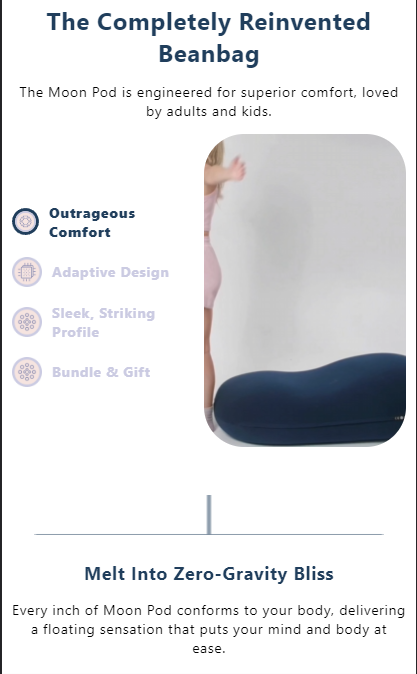
clickable tabs with video or image
A multi-column interactive section that syncs clickable text/icon headers with video or image showcases and detailed descriptions. It provides a visual storytelling experience frequently used to explain product features or materials.
- Tab-synced video and image display
- Interactive side-navigation headers
- Responsive three-column layout
- Auto-playing video component integration
- Dynamic text content switching
- Explaining complex product benefits or technology
- Showcasing lifestyle videos for specific features
- Creating an interactive 'How It Works' section
- Shopify Online Store 2.0
- Most Shopify themes
The code
1<div class="containerv8 product_tab_sec">2 <div class="inner-container">3 <div class="header-text">4 The Completely Reinvented Beanbag5 </div>6 <p>The Moon Pod is engineered for superior comfort, loved by adults and kids.</p>78 <div class="golden-capsule-three-col">9 <div class="item-headings">1011 <div class="items active">12 <div>13 <img src="//www.moonpod.co/cdn/shop/files/Rectangle_372.png?v=1715256659">14 <span class="feature_desk_heading">Outrageous Comfort</span>15 </div>16 <span class="feature_mob_heading"></span>17 </div>1819 <div class="items ">20 <div>21 <img src="//www.moonpod.co/cdn/shop/files/Rectangle_373.png?v=1715256658">22 <span class="feature_desk_heading">Adaptive Design</span>23 </div>24 <span class="feature_mob_heading"></span>25 </div>2627 <div class="items ">28 <div>29 <img src="//www.moonpod.co/cdn/shop/files/Rectangle_372_1.png?v=1715256658">30 <span class="feature_desk_heading">Sleek, Striking Profile</span>31 </div>32 <span class="feature_mob_heading"></span>33 </div>3435 <div class="items ">36 <div>37 <img src="//www.moonpod.co/cdn/shop/files/Rectangle_372_1.png?v=1715256658">38 <span class="feature_desk_heading">Bundle & Gift</span>39 </div>40 <span class="feature_mob_heading"></span>41 </div>4243 </div>44 <div class="img_container">4546 <div class="capsule-img active">4748495051 <video-component data-autoplay="true" data-background="true">52 <video playsinline="true" class="" autoplay="autoplay" muted="muted" loop="loop" preload="metadata"><source src="//www.moonpod.co/cdn/shop/videos/c/vp/5bdcdfe3eb454c0baf9fa624443cf5b9/5bdcdfe3eb454c0baf9fa624443cf5b9.HD-1080p-4.8Mbps-39672589.mp4?v=0" type="video/mp4"><img loading="lazy" hidden="" src="//www.moonpod.co/cdn/shop/files/preview_images/5bdcdfe3eb454c0baf9fa624443cf5b9.thumbnail.0000000000_small.jpg?v=1734131486"></video>53 </video-component>545556 </div>5758 <div class="capsule-img ">5960616263 <video-component data-autoplay="true" data-background="true">64 <video playsinline="true" class="" autoplay="autoplay" muted="muted" loop="loop" preload="metadata"><source src="//www.moonpod.co/cdn/shop/videos/c/vp/8652dcfb4ca34bfdb7a55bdc0821f91f/8652dcfb4ca34bfdb7a55bdc0821f91f.HD-1080p-7.2Mbps-39672615.mp4?v=0" type="video/mp4"><img loading="lazy" hidden="" src="//www.moonpod.co/cdn/shop/files/preview_images/8652dcfb4ca34bfdb7a55bdc0821f91f.thumbnail.0000000000_small.jpg?v=1734131541"></video>65 </video-component>666768 </div>6970 <div class="capsule-img ">7172737475 <video-component data-autoplay="true" data-background="true">76 <video playsinline="true" class="" autoplay="autoplay" muted="muted" loop="loop" preload="metadata"><source src="//www.moonpod.co/cdn/shop/videos/c/vp/913ce214c9074afaacb3fbd9596deb1e/913ce214c9074afaacb3fbd9596deb1e.HD-1080p-3.3Mbps-39672646.mp4?v=0" type="video/mp4"><img loading="lazy" hidden="" src="//www.moonpod.co/cdn/shop/files/preview_images/913ce214c9074afaacb3fbd9596deb1e.thumbnail.0000000000_small.jpg?v=1734131592"></video>77 </video-component>787980 </div>8182 <div class="capsule-img ">8384858687 <video-component data-autoplay="true" data-background="true">88 <video playsinline="true" class="" autoplay="autoplay" muted="muted" loop="loop" preload="metadata"><source src="//www.moonpod.co/cdn/shop/videos/c/vp/9a4367a1cef244299da97841f9bd75da/9a4367a1cef244299da97841f9bd75da.HD-1080p-7.2Mbps-39672674.mp4?v=0" type="video/mp4"><img loading="lazy" hidden="" src="//www.moonpod.co/cdn/shop/files/preview_images/9a4367a1cef244299da97841f9bd75da.thumbnail.0000000000_small.jpg?v=1734131666"></video>89 </video-component>909192 </div>9394 </div>95 <div class="text-container">9697 <div class="desc-tab active">98 <div class="desc-heading">Melt Into Zero-Gravity Bliss</div>99 <div class="desc-para"><p>Every inch of Moon Pod conforms to your body, delivering a floating sensation that puts your mind and body at ease.</p></div>100 </div>101102 <div class="desc-tab ">103 <div class="desc-heading">Experience Elevated Relaxation</div>104 <div class="desc-para"><p>Filled with thousands of high-density beads, Moon Pod creates a unique floating sensation that promotes comfort and relaxation. Moon Pod is both durable and portable, so you can enjoy personalized support for every moment.</p></div>105 </div>106107 <div class="desc-tab ">108 <div class="desc-heading">The Beanbag, Reinvented</div>109 <div class="desc-para"><p>Moon Pod’s minimalist design combines style with functionality. Its striking profile and contemporary colors fit seamlessly into any space, offering an updated take to bulky furniture.</p></div>110 </div>111112 <div class="desc-tab ">113 <div class="desc-heading">Share The Relaxation</div>114 <div class="desc-para"><p>Bundle Moon Pod with the Crescent Backrest, or the Lunar Lift Footrest, for the ultimate relaxation experience. Give the gift of comfort any time of year and transform their space into a comfort sanctuary.</p></div>115 </div>116117 </div>118 </div>119 </div>120</div>121122123<style data-shopify="">124 .category_product_item .card--product .card__media-main-img img, .category_product_item .card--product .card__hover-image img{125 object-fit: contain;126 }127 .immy-capsule{128 background: #F5F8FF;129 }130 @media(min-width:768px){131132133 .product_tab_sec{134 padding-bottom: 52px !important;135 }136 }137 .product_tab_sec .item-headings .items{138 display: flex;139 gap: 8px;140 }141 .product_tab_sec .item-headings .items>div{142 display: flex;143 align-items: center;144 gap: 10px;145 }146 .product_tab_sec .inner-containerv8 {147 margin: auto;148 display: flex;149 flex-direction: column;150 gap: 70px;151 }152 .containerv8 .img_container{153 flex: 37%;154 }155156 .product_tab_sec .header-text {157 color: var(--soil-1, #3B3D1D);158 text-align: justify;159 font-size: 48px;160 font-style: normal;161 font-weight: 900;162 line-height: 48px;163 margin-bottom:12px;164 }165166 .golden-capsule-three-col {167 display: flex;168 align-items: center;169 gap: 4%;170 }171172 .golden-capsule-three-col .item-headings {173 flex: 35%;174 }175176 .golden-capsule-three-col .capsule-img {177 flex: 20%;178 }179180181 .golden-capsule-three-col .text-container {182 flex: 35%;183 padding-left: 5%;184 }185186 .capsule-img {187 max-height: 409px;188 }189190 .capsule-img img {191 height: 100%;192 width: 100%;193 }194195 .product_tab_sec video{196 max-width: 450px;197 min-height: 400px;198 object-fit: cover;199 border-radius: 40px;200 }201202 .desc-tab {203 display: none;204 }205206 .desc-tab.active {207 display: block;208 }209210 .product_tab_sec .item-headings {211 display: flex;212 flex-direction: column;213 gap: 48px;214 }215216 .product_tab_sec .item-headings div span {217 cursor: pointer;218 color: var(--Brand-Purple, #CBCBE2);219 font-size: 24px;220 font-style: normal;221 font-weight: 700;222 line-height: 40px;223 }224225 .product_tab_sec .item-headings div.active span {226 color: #203E5C;227 font-size: 30px;228 font-style: normal;229 font-weight: 800;230 line-height: 40px;231 }232233 .golden-capsule-three-col .capsule-img{234 display:none;235 }236 .golden-capsule-three-col .capsule-img.active{237 display:block;238 }239240241242 .product_tab_sec .desc-tab {243 position: relative;244 }245246 .product_tab_sec .desc-tab::before {247 content: '';248 background-image: url('https://cdn.shopify.com/s/files/1/0039/5427/8515/files/Group_33837.png?v=1715339079');249 position: absolute;250 left: -87px;251 display: block;252 top: 50%;253 transform: translateY(-50%);254 background-repeat: no-repeat;255 height: 159px;256 width: 77px;257 background-size: 100% 100%;258 }259260 .product_tab_sec .item-headings img{261 max-width: 30px;262 }263264265 .golden-capsule-three-col {266 gap: 25px;267268 }269 .product_tab_sec{270 padding: 40px 20px;271 }272 .product_tab_sec .inner-container{273 gap: 0px;274 }275 .product_tab_sec .header-text{276 color: #203E5C;277 text-align: center;278 font-size: 36px;279 font-style: normal;280 font-weight: 700;281 line-height: 48px;282 }283 .product_tab_sec p{284 color: var(--color-BLACK, #000);285 text-align: center;286 font-size: 18px;287 font-style: normal;288 font-weight: 400;289 line-height: normal;290 text-align: center;291 }292 .product_tab_sec .capsule-img img{293 max-width: 463px;294 width: 100%;295 }296 .product_tab_sec .item-headings {297 display: flex;298 flex-direction: column;299 gap: 40px;300 }301 .product_tab_sec .feature_desk_heading:active{302 color: #203E5C;303 font-size: 30px;304 font-style: normal;305 font-weight: 800;306 line-height: 40px;307 }308309 /* .product_tab_sec .feature_desk_heading:active{310 color: #203E5C;311 /* font-size: 20px; */312 font-style: normal;313 font-weight: 800;314 line-height: 40px;315 } */316 .product_tab_sec .item-headings .items.active img {317 border-radius: 222px;318 border: 5px solid var(--Grey-Blue, #203E5C);319 background: url(<path-to-image>) lightgray -10.025px -12.75px / 144.033% 141.883% no-repeat;320 /* width: 51px;321 height: 51px; */322 max-width: 50px;323324 }325 .product_tab_sec .item-headings img{326327 }328 .product_tab_sec .desc-tab .desc-heading{329 color: #203E5C;330 font-size: 24px;331 font-style: normal;332 font-weight: 700;333 line-height: 26px; /* 108.333% */334 }335 .product_tab_sec .text-containerv8 p{336 color: #000;337 text-align: justify;338 font-size: 16px;339 font-style: normal;340 font-weight: 400;341 line-height: normal;342 margin-top: 10px;343 }344 .product_tab_sec .item-headings .items.active img{345 max-width: 50px;346 border-radius: 222px;347 border: 3px solid var(--Grey-Blue, #203E5C);348 background: url(<path-to-image>) lightgray -5.659px -10.029px / 160.211% 173.75% no-repeat;349 }350351 .product_tab_sec .item-headings div.active span {352 color: #203E5C;353354 font-size: 30px;355 font-style: normal;356 font-weight: 800;357 line-height: 40px;358 }359360 @media(min-width:768px){361 .golden-capsule-three-col {362 padding: 26px 0px 20px;363364 }365366 }367368 .product_slider {369 padding-bottom: 40px;370 }371 .product_slider a {372 margin: auto;373 display: block;374 max-width: 230px;375 }376 @media(max-width:768px){377 .product_tab_sec .item-headings .items.active img{378 max-width: 27px;379 border-radius: 222px;380 border: 3px solid var(--Grey-Blue, #203E5C);381 background: url(<path-to-image>) lightgray -5.659px -10.029px / 160.211% 173.75% no-repeat;382 }383.containerv8 {384 width: 100%;385 margin: 0 auto;386}387388 .product_tab_sec .desc-tab .desc-heading{389 font-size: 18px;390 text-align: center;391 }392 .product_tab_sec .text-containerv8 p{393 font-size: 14px;394 font-style: normal;395 line-height: normal;396 text-align: center;397 margin-top: 8px;398 }399 .product_tab_sec {400 padding: 24px 10px;401 }402 .golden-capsule-three-col {403 gap: 25px;404 display: grid;405 grid-template-columns: repeat(2, 1fr);406 }407408 .product_tab_sec .item-headings div span{409 font-size: 14px;410 font-style: normal;411 font-weight: 700;412 line-height: normal;413 }414 .product_tab_sec .item-headings div.active span {415 color: #203E5C;416 font-size: 14px;417 font-style: normal;418 font-weight: 800;419 line-height: normal;420 }421 }422 @media screen and (min-width:768px) {423 .feature_mob_heading {424 display: none;425 }426 }427428 @media screen and (max-width:767px) {429430 .product_tab_sec .inner-containerv8 {431 gap: 2px;432 }433434 .product_tab_sec .header-text {435 font-size: 24px;436 line-height: normal;437 font-style: normal;438 font-weight: 700;439 word-spacing: unset;440 }441442 .product_tab_sec p{443 font-size: 14px;444 font-style: normal;445 font-weight: 400;446 line-height: normal;447 }448449 .golden-capsule-three-col {450 flex-wrap: wrap;451 }452 .product_tab_sec .item-headings {453 gap: 16px;454 }455456 .golden-capsule-three-col .text-container {457 flex: 100%;458 padding-left: 0px;459 margin-top: 80px;460 grid-column: span 2;461 }462463 .product_tab_sec .desc-tab::before {464 background-image: url('https://cdn.shopify.com/s/files/1/0039/5427/8515/files/Group_33837.png?v=1715339079');465 top: -220px;466 left: 50%;467 height: 350px;468 width: 40px;469 transform: translateX(-50%) rotate(90deg);470 }471472 .product_tab_sec .desc-tab .desc-para {473 font-size: 14px;474 }475 .product_tab_sec video{476 max-width: 202px;477 min-height: 313px;478 }479 }480 @media(min-width:1400px){481.containerv8 {482 width: 75%;483 margin: 0 auto;484}485</style>486487<script>488 var itemHeadings = document.querySelectorAll('.golden-capsule-three-col .item-headings>div');489 var textContainers = document.querySelectorAll('.golden-capsule-three-col .text-container div.desc-tab');490 var imgContainers = document.querySelectorAll('.golden-capsule-three-col .img_container .capsule-img');491492 itemHeadings.forEach((heading, index) => {493 heading.addEventListener('click', () => {494 itemHeadings.forEach((item) => item.classList.remove('active'));495 textContainers.forEach((item) => item.classList.remove('active'));496 imgContainers.forEach((item) => item.classList.remove('active'));497498 heading.classList.add('active');499 imgContainers[index].classList.add('active');500 textContainers[index].classList.add('active');501 });502 });503</script>
How to install clickable tabs with video or image on your Shopify theme
This snippet belongs in sections/main-product.liquid, below the product description, where shoppers look for answers. Expect the whole job to take about 15–25 minutes.
- 1From your Shopify admin, open Online Store → Themes, click the … button on your live theme and choose Duplicate. Always work on a copy so you can roll back instantly.
- 2On the duplicated theme, click … → Edit code to open the theme code editor.
- 3Open sections/main-product.liquid in the file tree. If your theme uses different file names, search for the template that renders the area where you want the block to show up.
- 4Click Copy code on this page, then paste the snippet below the product description, where shoppers look for answers.
- 5The snippet ships with its own scoped
<style>block, so you do not need to touchbase.cssortheme.css. If you prefer to keep CSS centralised, move the contents of the style tag into your theme stylesheet and delete the inline block. - 6Keep the
<script>tag at the end of the snippet. It only runs once the surrounding markup exists in the DOM, so moving it higher up the file can break the behaviour. - 7Click Save, then hit Preview and check the block on desktop, tablet and mobile widths.
- 8When you are happy with the result, publish the duplicated theme from Online Store → Themes → Actions → Publish.
How to customise it
Every value below lives inside the snippet, so you can adapt clickable tabs with video or image to your brand without touching the rest of the theme.
- Colours — the snippet uses
#F5F8FF,#3B3D1D,#CBCBE2,#203E5C. Replace those values inside the style block with your brand palette, keeping at least a 4.5:1 contrast ratio between text and background so the block stays accessible. - Sizing — adjust the font-size values (48px, 24px, 30px) and the padding so the block carries the same visual weight as the elements around it.
- Corners —
border-radius: 40pxcontrols the roundness. Set it to 0 for a sharper editorial look, or increase it for a softer, app-like feel. - Images — replace the placeholder image URLs with your own assets. Upload them under Content → Files in Shopify admin and use the generated CDN URL, or reference a theme asset with
{{ 'my-image.png' | asset_url }}. - Copy — rewrite the hard-coded text (for example “Outrageous Comfort”) in your own brand voice, and translate it if you sell in more than one language.
- Responsive behaviour — the
@mediaquery defines the mobile breakpoint. Adjust the pixel value if your theme uses a different breakpoint scale.
Common mistakes to avoid
These are the issues merchants run into most often when installing a snippet like this one.
- Editing the live theme directly. Duplicate it first — a single unbalanced Liquid tag can take a storefront down mid-campaign.
- Pasting the code into the wrong file. Dropped into
layout/theme.liquidinstead ofsections/main-product.liquid, this block will render on every page of the store, including ones where it makes no sense. - Renaming the CSS classes in the markup but not in the style block, or vice versa. The class names have to match exactly or the styling silently disappears.
- Adding the snippet twice on the same page. The script targets its selector, so two copies can conflict or double-fire.
- Publishing without testing on a real phone. Most Shopify traffic is mobile, and layout problems almost always surface there first.
Performance notes
What this block costs you in load time, and how to keep that cost at zero.
- The CSS is inline and scoped to this block, so it adds no extra network request. At a few kilobytes it has no measurable effect on your Lighthouse score.
- The JavaScript is vanilla — no jQuery, no external library, no additional request. Keep it after the markup so it never blocks rendering.
- Add
loading="lazy"plus explicit width and height attributes to every image in the snippet. That prevents Cumulative Layout Shift, which is a Core Web Vitals ranking factor. - Run PageSpeed Insights before and after you add the block so you have a concrete number rather than a guess.
SEO & accessibility
How to add this block without damaging your on-page structure or your rich results.
- Nothing in this snippet should replace your page
<h1>. Keep product and page headings intact and use<h2>or<h3>for the block's own heading so the document outline stays clean. - Write a descriptive alt attribute for every image. Empty or generic alt text is one of the most common accessibility and SEO issues on Shopify stores.
- If the block shows review or rating content, keep it consistent with the structured data your review app already outputs. Duplicating or contradicting rating markup can cost you the rich result entirely.
- The block does not create a new URL, so there is no canonical or indexing change to make. It improves on-page engagement signals rather than crawlability.
clickable tabs with video or image — questions merchants ask
Will this snippet work with my theme?
It is built with standard Liquid, HTML and CSS, so it works with Dawn and virtually every Online Store 2.0 theme, as well as most vintage themes. The only thing that changes between themes is the file you paste it into — if yours has no sections/main-product.liquid, look for the equivalent template that renders the same area.
Do I need an app to use it?
No. This is theme code you own outright: no monthly fee, no third-party script tag, and no app that can break your storefront the next time it updates.
How long does it take to add “clickable tabs with video or image” to a store?
Most merchants have it live in under fifteen minutes — duplicate the theme, paste the code, adjust the colours and copy, preview on mobile, publish.
The block appears but nothing happens. What is wrong?
That is almost always a script-order problem. Check that the script tag is still at the bottom of the snippet and that the markup was not pasted inside another script or a Liquid comment block. Open your browser console and look for an error naming the snippet's selector.
The styling looks broken after pasting. How do I fix it?
Confirm you copied the whole snippet including the closing style tag, then check whether one of your theme's own CSS rules is overriding it. If a theme rule wins, increase the specificity of the snippet's selector rather than scattering !important through the file.
Will it slow my store down?
Not meaningfully. It is inline markup with scoped CSS and at most a few lines of vanilla JavaScript — no external libraries, no extra HTTP request. Optimising your product images will always have a far bigger impact on load time.
Can I use it on a client store or a commercial project?
Yes. Every snippet in the MCO Hub library is free to copy, modify and ship on any store, including client work. Attribution is appreciated but not required.
Related snippets
Keep exploring
Guides
Shopify Liquid
Tools