
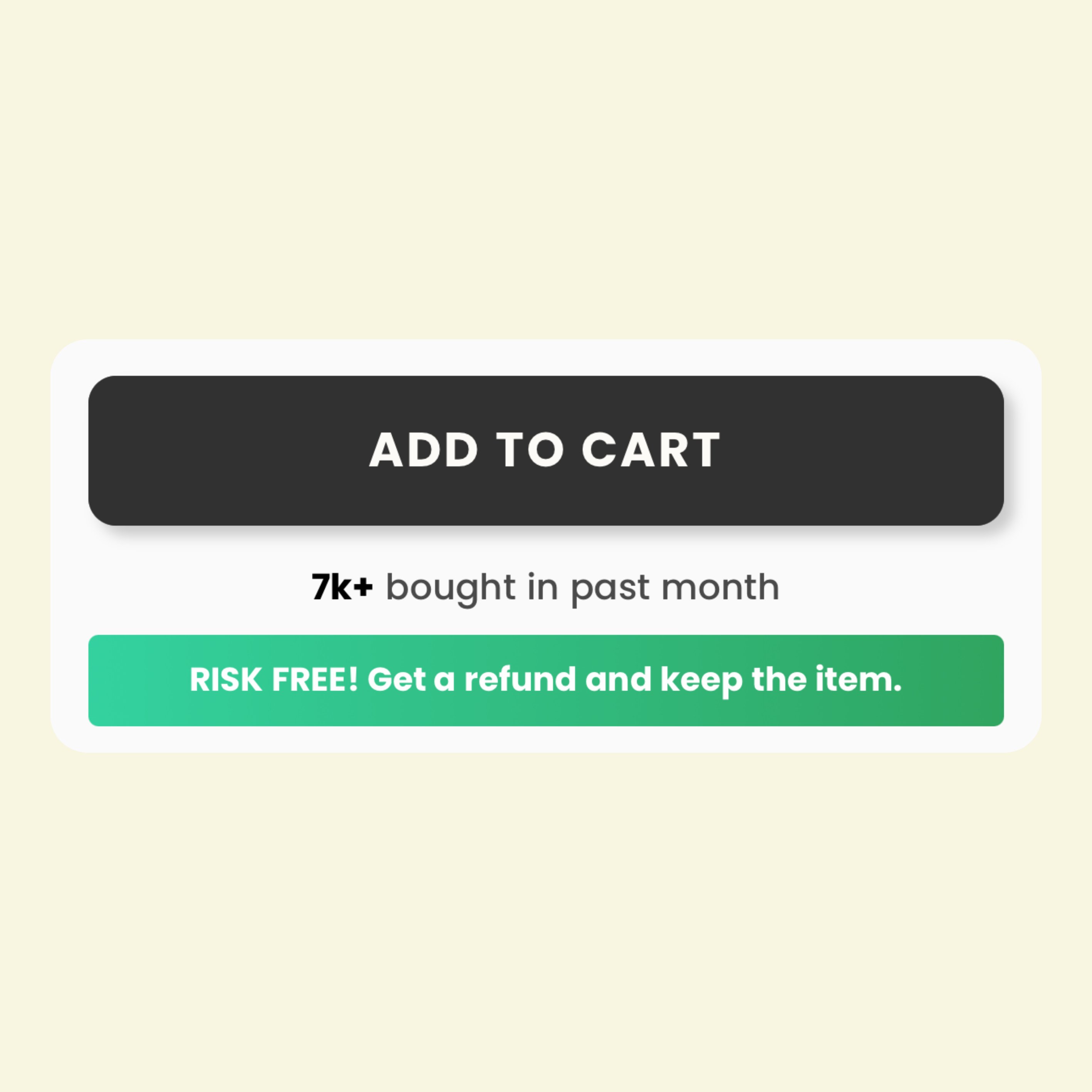
Risk Free 2
Adds a high-conversion social proof display featuring a monthly sales counter and a full-width call-to-action button. It uses a green gradient design intended to build buyer confidence and reduce perceived purchase risk through a bold refund guarantee message.
- Social proof sales counter highlight
- Mobile-responsive full-width button design
- High-visibility green gradient styling
- CSS-isolated naming to prevent theme conflicts
- Below the 'Add to Cart' button to reduce bounce rates
- On high-ticket product pages to lower customer hesitation
- As a trust-building element near the checkout flow
- Most Shopify themes
- Shopify Online Store 2.0
The code
1<!DOCTYPE html>2<html lang="en">3<head>4 <meta charset="UTF-8">5 <meta name="viewport" content="width=device-width, initial-scale=1.0">6 <title>Responsive Full-Width Design</title>7 <style>8 body.uniqueBodyIdentifier_ab89x73lmn {9 font-family: Arial, sans-serif;10 margin: 0;11 padding: 0;12 display: flex;13 justify-content: center;14 align-items: center;15 height: 100vh;16 background-color: transparent;17 }1819 .contentWrapper_xz98mn45qwe {20 width: 100%; /* Genişlik %100 olarak kalır */21 text-align: center;22 }2324 .textAboveButton_12lm45xzq {25 font-size: 18px; /* Üst metin boyutu */26 margin-bottom: 10px;27 color: #4a4a4a; /* Normal metin rengi */28 }2930 .textAboveButton_12lm45xzq span.highlight_89mnx12opq {31 color: #000; /* Satış sayısı siyah ve bold */32 font-weight: bold;33 }3435 .buttonStyle_xz23mn89qwe {36 display: inline-block;37 width: 100%; /* Buton genişliği %100 */38 font-size: 16px;39 font-weight: bold;40 color: #fff; /* Buton yazı rengi */41 background: linear-gradient(to right, #34d2a0, #30a560); /* Gradyan renkler */42 padding: 15px; /* Mobilde tıklama kolaylığı için padding artırıldı */43 border-radius: 4px;44 cursor: pointer;45 text-decoration: none;46 transition: background 0.3s ease;47 border: none;48 box-sizing: border-box;49 }5051 .buttonStyle_xz23mn89qwe:hover {52 background: linear-gradient(to right, #30a560, #34d2a0); /* Hover için gradyan ters çevrildi */53 }5455 /* Mobil uyum için medya sorgusu */5657@media58 (max-width: 768px) {59 .textAboveButton_12lm45xzq {60 font-size: 16px; /* Üst metin mobilde küçültüldü */61 }6263 .buttonStyle_xz23mn89qwe {64 font-size: 14px; /* Buton yazısı boyutu küçültüldü */65 padding: 12px; /* Daha dar ekranlarda padding azaltıldı */66 }67 }686970@media71 (max-width: 480px) {72 .textAboveButton_12lm45xzq {73 font-size: 14px; /* Daha küçük ekranlar için yazı boyutu */74 }7576 .buttonStyle_xz23mn89qwe {77 font-size: 13px; /* Buton yazı boyutu daha da küçültüldü */78 padding: 10px; /* Tıklama alanı optimize edildi */79 }80 }81 </style>82</head>83<body class="uniqueBodyIdentifier_ab89x73lmn">84 <div class="contentWrapper_xz98mn45qwe">85 <div class="textAboveButton_12lm45xzq">86 <span class="highlight_89mnx12opq">7k+</span> bought in past month87 </div>88 <a href="#" class="buttonStyle_xz23mn89qwe">RISK FREE! Get a refund and keep the item.</a>89 </div>90</body>91</html>
How to install Risk Free 2 on your Shopify theme
This snippet belongs in sections/main-product.liquid, directly under the Add to cart button, where it reinforces the purchase decision. Expect the whole job to take about 5–10 minutes.
- 1From your Shopify admin, open Online Store → Themes, click the … button on your live theme and choose Duplicate. Always work on a copy so you can roll back instantly.
- 2On the duplicated theme, click … → Edit code to open the theme code editor.
- 3Open sections/main-product.liquid in the file tree. If your theme uses different file names, search for the template that renders the area where you want the block to show up.
- 4Click Copy code on this page, then paste the snippet directly under the Add to cart button, where it reinforces the purchase decision.
- 5The snippet ships with its own scoped
<style>block, so you do not need to touchbase.cssortheme.css. If you prefer to keep CSS centralised, move the contents of the style tag into your theme stylesheet and delete the inline block. - 6Click Save, then hit Preview and check the block on desktop, tablet and mobile widths.
- 7When you are happy with the result, publish the duplicated theme from Online Store → Themes → Actions → Publish.
How to customise it
Every value below lives inside the snippet, so you can adapt Risk Free 2 to your brand without touching the rest of the theme.
- Colours — the snippet uses
#4a4a4a,#000,#fff,#34d2a0. Replace those values inside the style block with your brand palette, keeping at least a 4.5:1 contrast ratio between text and background so the block stays accessible. - Gradient — swap the
linear-gradient(...)declaration for a flat background colour if you want a more minimal, theme-native look. - Typography — the block declares
font-family: Arial, sans-serif. Delete that line to inherit your theme font instead, which usually looks better integrated. - Sizing — adjust the font-size values (18px, 16px, 14px) and the padding so the block carries the same visual weight as the elements around it.
- Corners —
border-radius: 4pxcontrols the roundness. Set it to 0 for a sharper editorial look, or increase it for a softer, app-like feel. - Copy — rewrite the hard-coded text (for example “Responsive Full-Width Design”) in your own brand voice, and translate it if you sell in more than one language.
- Responsive behaviour — the
@mediaquery defines the mobile breakpoint. Adjust the pixel value if your theme uses a different breakpoint scale.
Common mistakes to avoid
These are the issues merchants run into most often when installing a snippet like this one.
- Editing the live theme directly. Duplicate it first — a single unbalanced Liquid tag can take a storefront down mid-campaign.
- Pasting the code into the wrong file. Dropped into
layout/theme.liquidinstead ofsections/main-product.liquid, this block will render on every page of the store, including ones where it makes no sense. - Renaming the CSS classes in the markup but not in the style block, or vice versa. The class names have to match exactly or the styling silently disappears.
- Publishing without testing on a real phone. Most Shopify traffic is mobile, and layout problems almost always surface there first.
Performance notes
What this block costs you in load time, and how to keep that cost at zero.
- The CSS is inline and scoped to this block, so it adds no extra network request. At a few kilobytes it has no measurable effect on your Lighthouse score.
- Run PageSpeed Insights before and after you add the block so you have a concrete number rather than a guess.
SEO & accessibility
How to add this block without damaging your on-page structure or your rich results.
- Nothing in this snippet should replace your page
<h1>. Keep product and page headings intact and use<h2>or<h3>for the block's own heading so the document outline stays clean. - Any link you add here is an internal link. Point it at a real collection or page rather than
#, and use descriptive anchor text instead of “click here”. - If the block shows review or rating content, keep it consistent with the structured data your review app already outputs. Duplicating or contradicting rating markup can cost you the rich result entirely.
- The block does not create a new URL, so there is no canonical or indexing change to make. It improves on-page engagement signals rather than crawlability.
Risk Free 2 — questions merchants ask
Will this snippet work with my theme?
It is built with standard Liquid, HTML and CSS, so it works with Dawn and virtually every Online Store 2.0 theme, as well as most vintage themes. The only thing that changes between themes is the file you paste it into — if yours has no sections/main-product.liquid, look for the equivalent template that renders the same area.
Do I need an app to use it?
No. This is theme code you own outright: no monthly fee, no third-party script tag, and no app that can break your storefront the next time it updates.
How long does it take to add “Risk Free 2” to a store?
Most merchants have it live in under fifteen minutes — duplicate the theme, paste the code, adjust the colours and copy, preview on mobile, publish.
The styling looks broken after pasting. How do I fix it?
Confirm you copied the whole snippet including the closing style tag, then check whether one of your theme's own CSS rules is overriding it. If a theme rule wins, increase the specificity of the snippet's selector rather than scattering !important through the file.
Will it slow my store down?
Not meaningfully. It is inline markup with scoped CSS and at most a few lines of vanilla JavaScript — no external libraries, no extra HTTP request. Optimising your product images will always have a far bigger impact on load time.
Can I use it on a client store or a commercial project?
Yes. Every snippet in the MCO Hub library is free to copy, modify and ship on any store, including client work. Attribution is appreciated but not required.
Related snippets


Keep exploring
Guides
Shopify Liquid